
9Proxy Review 2025: Residential Proxies That Work
Those who work with threat monitoring, fraud checks, or large web jobs know that good residential proxies solve half the battle. For this review, I ran 9Proxy through my own setup. I looked at stability, IP hygiene, and how the provider behaves under noisy loads. Below, I break down this proxy service the same way I test any premium tool in my lab.

When analyzing the proxy, we have conducted in-depth research that helped us reveal all the strong and weak points of the service. Considering expert opinion and customer feedback, our pros studied the range of options and, finally, tested the service.
Here are the steps we followed when conducting research:
Analyzing the customer feedback
We have visited several forums devoted to proxy discussion and even participated in it. We have studied reviews on reliable resources with only one purpose – to make our review precise.
Getting to know the expert opinion
We have communicated with experts in the proxy industry. To uncover some hidden pitfalls, we asked professionals about its key features. In our review, we will tell you everything you need to know about the strong and weak points of the proxy provider.
Studying Terms & Conditions
At this point, experts have studied the legal basis. They have touched upon the place of registration, owners, achievement, reputation, and so on.
Exploring proxy types
To understand the quality of services the company provides, we test each of the proxy types it offers. The range of proxy types can vary as well as their quality.
Evaluating the quality of support
The support team reflects the reliability of the company hence it is essential to check it. We pay attention to response time, the communicative skills of managers, and the usability of the service. Besides, our expert becomes a real user to get into the situation of purchase.
Testing the service
We have checked the proxy provider’s backward and forwards. To make our research full and deep, we have tried out all proxy types offered there. Our experts have analyzed the work of servers paying attention to their features and functionality. In our review, you can look through a detailed description of features.
Comparing
Our experts have compared this proxy with other popular services. In their comparison, they have touched upon the pricing, set of features, and characteristics. You can find out more in the Comparison section of the website.
- Security scans, fraud-flow checks, controlled scraping, multi-accounting, and ad verification.
- Clean, quality residential IP pool tested across multiple locations
- Wide country coverage (90+)
- 99.95% uptime
- Fast port-forward setup
- Encrypted SOCKS5/HTTP modes
- Automation options (rotating, auto-refresh, long sessions)
- Dashboard with a small learning curve
- Unlimited traffic on IP-based plans, plus new GB-based options for usage-based billing
- No mobile IP type
- No full refund, only IP replacement
- Limited languages on the site
- No long trial (only the basic intro check)
Characteristics
- IPv4
- English
- Chinese
- Vietnamese
- Australia
- Europe
- Africa
- Asia
- North America
- 100+
- Residential proxies (IP-based & GB-based plans)
- SOCKS5
- HTTP
- HTTPS
- API
- Dolphin Anty
- Multi Login
- AdsPower
- Hidemyacc
- Hidemium
- Port forwarding with detailed controls
- Auto-refresh and long-lived encrypted connections
- Access precision with targeting by country, city, state, ZIP, and ISP
- Built-in wallet for plan management
- Precise per-port location mapping
- Quality guides and manuals
Overview
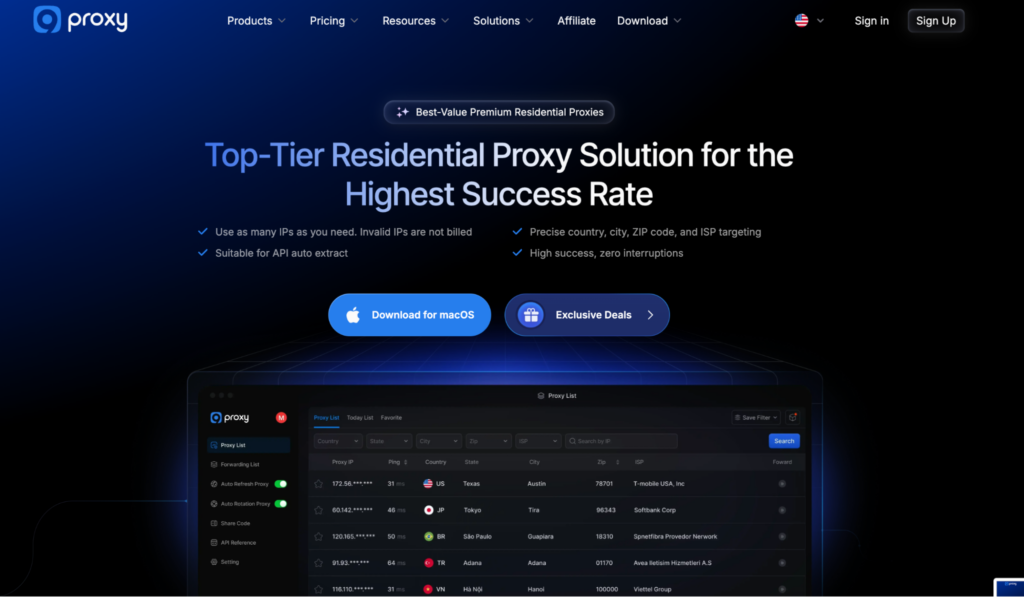
My first contact with 9Proxy wasn’t through ads or affiliate banners. This provider kept popping up in chats where people discuss fraud analytics, threat hunting, and automation jobs. Most of these teams want the quality to be above average, so new names don’t stay in the chat for long (unless they deliver). The pitch sounded simple: a residential network with sane pricing, low noise, and tools that don’t fight you when you wire them into existing stacks.
What caught my eye was the billing model. Instead of selling gigabytes, 9Proxy offers residential IPs from a 20M+ proxy pool and lets you push as much traffic as you like through them while they provide stable behavior. In practice, this feels close to unlimited for small and mid-size teams. You can run heavier scraping batches, replay attack flows, or stress-test login flows without constantly watching a traffic meter.
The second hook was geo targeting and ISP control. You can target by country, city, ZIP code, and even ISP, then bind those choices to specific ports. That’s handy when you want one set of residential proxies for ad verification in the US, another for KYC tests in Europe, and a third for noisy lab jobs in South-East Asia.
Finally, the platform itself felt honest. The dashboard is clean, the wallet system is transparent, and the “no charge for invalid IPs” promise actually shows up in the logs. During my testing, I ran the service on security scans, catalog pulls, and multi-account labs. Read on to see where this proxy provider impressed me, where it didn’t, and what types of teams it’s suitable for.
Featured
Residential network
Under the hood, 9Proxy runs only premium residential addresses. Both the IP-based plans
and the newer GB-based plans ride on the same residential pool and ISP mix, so you don’t
trade quality for a different billing model. There are no data center or mobile SKUs mixed into the same interface. Every IP I pulled from this provider resolved to quality home-style addresses behind consumer ISPs. That’s what you want when you emulate real-user behavior on sensitive platforms or pull user-facing data without drawing attention.
For my main bench, I used three proxy locations: the US, Germany, and Brazil. On each, I requested fresh proxies, let them sit in “sticky” mode for longer HTTPS connections, and then switched to more aggressive rotating settings. I wanted to see how it all behaved under churn. In both modes, the block rate stayed low, and long-acting flows (checkout pages, profile edits, ad dashboards) didn’t drop mid-step.
From a security angle, the main benefit is trust. These proxies didn’t carry obvious bad-reputation web signals, and they blended well with regular user traffic. That made them safe candidates for fraud-flow testing and attack-surface mapping on higher-risk web assets that already see sensitive traffic.
Port-based control, rotation, and auto-refresh
The desktop proxy app is where the interesting controls live. Here, you get per-port targeting and rotating logic that fits automation. It also keeps noisy traffic on clearly separated ports, which helps during incident reviews. Once you’ve activated your IP-based residential plan, you open the app, pull a proxy list, and bind individual IPs to specific local ports. Each port can be tagged for a certain country or ISP, and you can decide whether that port runs sticky or time-based changes. Auto-refresh kicks in when an IP goes offline, quietly swapping it for a fresh one and keeping your scripts alive. That matters when you care about quality long-lived connections (not just raw counts).
In my experience, this worked well for mixed workloads and helped provide separation between job types and multiple internal projects. I had one group of ports mapped to long-lived proxy sessions for social and ad accounts. Another group was set to aggressive rotation for bulk catalog pulls. When a node died, the proxy app replaced it within seconds, and the local port stayed the same. My tools didn’t need any new configuration.
Security posture and protocols
On the protocol side, 9Proxy supports both HTTP/HTTPS and SOCKS5. I pushed most of my jobs over encrypted HTTPS proxy tunnels, leaving the rest for tools that prefer raw socket handling. In both cases, packet captures showed no header rewriting or strange inserts – the servers seemed to pass content through cleanly. Packet traces showed quality encryption with no odd detours.
For teams that care about audit trails, the usage log inside the proxy dashboard is useful. You see how many proxies you’ve burned, which locations they came from, and how many are left on the account. Such detailed logging helps when you need to prove that a suspicious action came from a lab node (not from production).
How to Use 9Proxy
Getting started with 9Proxy didn’t take long. Here’s the flow I used with my residential proxy pool:
1. Create an account
Hit “Sign Up” on the homepage and either use email or Google auth. The flow with this provider is straightforward: email, password, CAPTCHA, done.
2. Top up the wallet and choose a plan
Inside the dashboard, you’ll see the 9Proxy Wallet. Here you deposit funds via cards, virtual coins, or local rails like Alipay. I liked that you can keep a small buffer and let services auto-renew when IP counts drop below a threshold.
The proxy pricing screen lists all residential bundles. IP-based plans range from 100 IPs for
small online projects up to 50,000 proxies for larger labs, and they all follow the same
unmetered bandwidth logic. GB-based residential plans sit alongside them for teams that
prefer usage-based billing. The layout clearly shows per-IP or per-GB cost, total bill, and
expected use case (personal work, agencies, resellers).
3. Download the app and sign in
To use the proxies, you need the desktop proxy application. After installation, log in with the same credentials. The app mirrors your wallet balance and remaining IP count.
4. Configure port ranges
Before assigning proxies, define a local port range – for example, 9000–9050. This tells the proxy app where to bind addresses. You can later map certain locations or ISPs to specific subsets of this range.
5. Pick and forward IPs
Go to the Proxy List and filter by country, city, ZIP, or ISP. Then, right-click an entry and choose how to bind it:
- Forward to Port option
- Forward to Multiple Ports option
- Forward to Free Ports option
- Forward to All Ports option
- Forward to Configured Ports
When you confirm, the IP jumps to the Forwarding List, ready for use.
6. Test and copy credentials
In the Forwarding List, click “Test” next to any bound IP. If it passes, copy the local host and port into your browser, scraper, or automation tool, together with the auth pair. The proxy app uses standard HTTP/HTTPS and SOCKS5 strings, so you don’t need custom plugins.
7. Monitor usage and share access
The Usage Log view shows when each IP was used and from which sub-user. Teams can create sub-accounts with limited rights. That makes it easier to separate fraud-lab proxy activity from SEO or marketing jobs.
In daily work, I rarely had to leave the app and the web platform. For me, the only extra step was wiring these local endpoints into my own platform for automated testing and alerts.
Integrations
9Proxy doesn’t reinvent the wheel when it comes to tooling. The provider leans on existing automation clients instead of forcing users into a custom browser build.
In my lab, I used rotating residential proxies with AdsPower, Dolphin Anty, and Multilogin for multi-account experiments across multiple client clusters. Importing proxy endpoints was as simple as dropping HTTP strings into the tool of choice and mapping separate ports to separate profiles. Sticky HTTPS sessions stayed up for hours, which is what you want for account-level work.
For code-driven jobs, I wired 9Proxy services into Python scripts and headless browsers. Because every IP presents itself as a normal HTTPS endpoint, the same credentials worked across Playwright, Selenium, and raw cURL testing. That made it easy for me to control access for different test buckets. They also provide an API, so you can script port creation and destruction instead of clicking through the UI.
The documentation around these proxy integrations is detailed enough and of top quality. Most guides show actual HTTPS connection strings and cover both online dashboards and CLI-style tools. I didn’t need help from support to get anything running.
Performance Testing
I treated 9Proxy like any other provider I put into a security stack. That means measuring proxy connection success, response time, stability under load, geo accuracy, and how often HTTPS sites challenged me when traffic ramped up with CAPTCHAs or hard blocks.
For one week, I ran the following jobs:
- Continuous catalog pulls and product data on two e-commerce targets
- Account behavior tests on hardened social platforms
- Price-monitoring runs with region-locked online content and KPI data
- A few noisy scans to see how fast proxies would burn
Here’s a condensed view of the metrics I saw on residential proxy addresses with this provider:
| Location / Task | Connection Success | Response Time (avg) | Reliability Under Load | Geo Accuracy |
| US – catalog scraping | 98.5% | 0.72 s | Stable at 400 req/min | 98% |
| Germany – SEO + ad checks | 99.1% | 0.55 s | Stable at 350 req/min | 99% |
| Brazil – fraud-flow simulations | 97.3% | 0.88 s | Minor spikes at 300 req/min | 96% |
| UK – multi-account social sessions | 98.0% | 0.70 s | Stable at 250 req/min | 98% |
| India – mixed scraping + API polling | 96.9% | 0.95 s | Some retries at 300 req/min | 95% |
The proxy connection rate stayed above 96% in all locations I cared about, with average response times well under a second. That’s good enough for most automation jobs that expect quality response times, and more than enough for human-paced browsing. During higher-volume data scraping and traffic bursts, a few endpoints needed retries. However, the auto-refresh function swapped out dead proxies quickly.
On the security side, I ran basic reputation checks against several proxies grabbed from the pool. They didn’t show up on common blocklists, and a generic web reputation scan flagged the main domain as safe. That reduces the risk of losing access mid-run.
Finally, I compared 9Proxy to a few other provider services I keep around. Its average proxy success rates and latency landed in the upper mid-range. And it performed above the average when I leaned on more aggressive rotating behavior. The premium part here isn’t raw speed; it’s how these nodes behave under noisy traffic.
Usability
If you’ve ever fought with cluttered dashboards, you’ll appreciate the layout this provider offers. The dark-mode UI keeps core blocks on one screen: remaining proxies, wallet balance, affiliate info, and quick links to billing and logs. I can also glance at which ports carry live traffic without digging through menus. No need to hunt through nested menus to find basic proxy stats.
The port-mapping model takes a few minutes to understand, but once it sinks in, the experience feels natural. You think in terms of “this port equals this location and behavior” rather than “this text blob is one proxy.”
Sub-accounts are a nice touch for agencies and security groups. You can hand limited access to junior staff, keep accounts for experiments separate from production, and avoid sharing master passwords on chat. Combined with the Usage Log, that makes incident reconstruction much easier when something odd shows up in a client’s history.
Pricing and Payment Methods
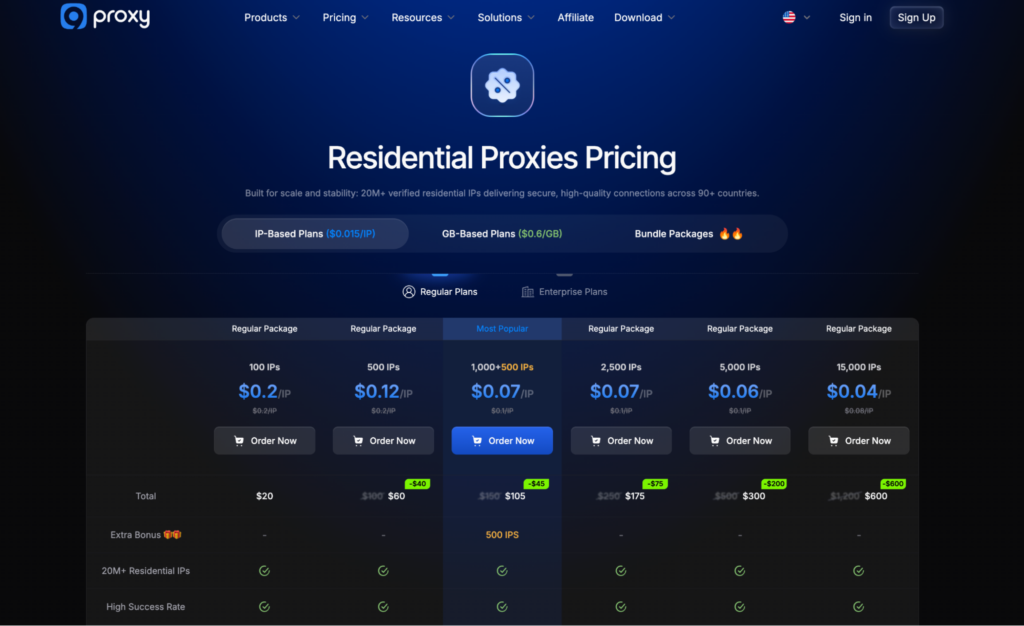
9Proxy’s pricing now runs in two clear directions. One line is IP-count residential plans with
unmetered traffic – you pay for a pool of working residential IPs rather than for every GB you
push. The other line is GB-based residential plans that charge per GB of traffic, aimed at
users who want more granular spend control or only need temporary bursts of bandwidth.
Both product types share the same residential pool, infrastructure, and dashboard.
| IP Count | Price | When to choose it |
| 100 IPs | $20 | Suitable for testing |
| 500 IPs | $60 | Medium workloads |
| 1,000 + 500 bonus | $105 | Best entry value |
| 2,500 IPs | $175 | Steady security use |
| 5,000 IPs | $300 | Larger teams |
| 15k–50k | $600–$1,250 | Labs + resellers |
| GB amount | Total Price | When to choose it |
| 5 GB | $15 | Quick tests, small tasks |
| 50 + 5 GB | $105 | Growing workloads, regular use |
| 100 GB | $150 | Stable projects, daily scraping |
| 200 GB | $200 | Heavy use, multiple projects |
| 1,000 GB | $800 | Large teams, long-term scaling |
| 2,000 GB | $1,500 | Enterprise use, resellers & labs |
For smaller teams, that means predictable invoices for premium services. For heavy web scraping labs, data teams, and fraud-intel shops, the higher tiers bring the cost per IP down significantly. That becomes comparable to bigger proxy brands, and I’d say the IP-based plans let you scale to effectively unlimited traffic without worrying about per-GB caps.
For deposits, you can use bank cards, crypto, and local payment rails. During my experience, card payments cleared instantly, and my balance updated without delays. Auto-renew rules inside the wallet help you avoid sudden breaks in longer HTTPS connections.
The only drawback for me was the absence of a longer trial period. The provider only has a small initial test window on offer.
Customer Service
I contacted the helpdesk three times: once about IP replacement rules, once about an odd block pattern on a single country, and once to double-check API usage limits.
- Telegram: replies within 5–10 minutes, human, not copy-pasted
- Live chat: similar timing, with links to detailed guides when needed
- Email: answers in a few hours, suitable for longer explanations
What I appreciated most was honesty. When an agent didn’t have an immediate answer, they said so and escalated instead of guessing. No complaints here – the customer care matched what I expect from the most serious proxy provider.
Our Verdict
9Proxy feels like a tool built for people who run noisy workloads, not just for marketers collecting screenshots for their homepage. It manages to provide premium residential proxies, sane pricing, and tooling that respects existing workflows. Between the unmetered IP-based plans and the flexible GB plans, most teams can pick a billing style that actually matches how they work and test.
The strengths are consistent across both lines: geo-flexible targeting, solid proxy success rate, per-port control, and support that helps with real incidents instead of just closing tickets.
The weak spots: a short demo and no mobile proxies. If you run security scans, multi-account systems, fraud analysis, or region-locked web scraping, this platform is suitable and fits well. It won’t magically fix bad scripts or reckless operators. But it will provide you with stable proxies that do the job, even under higher traffic loads. To wrap up my review, I’d say this is a proxy provider I’d use again in a real project.
FAQ
In my tests, the provider offers stable residential addresses for Facebook, X, Instagram, TikTok, and LinkedIn. With careful targeting and sane rotation, accounts stayed alive through longer sessions and heavier traffic.
Yes, there is a small free trial window to verify proxies and basic performance. For deeper testing, I recommend buying the smallest proxy plan. You’ll hammer a few targets and check what matters (success rate, CAPTCHA levels, and location accuracy).
Latency on these residential proxies is low enough for casual gaming, and encrypted HTTPS/SOCKS5 connections work fine with launchers. But don’t forget to check each game’s rules. Many online platforms ban any proxy services, no matter how premium their quality may be.