After 45 hours of digging through proxy services, I've figured out which solution is best for this year's Discord app. I evaluated these services based on specific criteria, which included blazing speed for voice chats, robust security to circumvent IP blocks, compatibility with Discord's app across devices, free trial options, fair pricing, various proxy types, and ease of setup even for a novice. The solutions from this article will help you to unlock Discord and make it faster, safer, and more reliable; also, it will be interesting for those who are engaged in multi-accounting.
When analyzing the proxy, we have conducted in-depth research that helped us reveal all the strong and weak points of the service. Considering expert opinion and customer feedback, our pros studied the range of options and, finally, tested the service.
Analyzing the customer feedback
We have visited several forums devoted to proxy discussion and even participated in it. We have studied reviews on reliable resources with only one purpose – to make our review precise.
Getting to know the expert opinion
We have communicated with experts in the proxy industry. To uncover some hidden pitfalls, we asked professionals about its key features. In our review, we will tell you everything you need to know about the strong and weak points of the proxy provider.
Studying Terms & Conditions
At this point, experts have studied the legal basis. They have touched upon the place of registration, owners, achievement, reputation, and so on.
Exploring proxy types
To understand the quality of services the company provides, we test each of the proxy types it offers. The range of proxy types can vary as well as their quality.
Evaluating the quality of support
The support team reflects the reliability of the company hence it is essential to check it. We pay attention to response time, the communicative skills of managers, and the usability of the service.
Testing the service
We have checked the proxy provider backwards and forwards. To make our research full and deep, we have tried out all proxy types offered there.
Comparing
Our experts have compared this proxy with other popular services — pricing, features, and characteristics. You can find more in the Comparison section of the website.
When you're chatting with your friends on Discord or engaging in other messenger activities, you may encounter obstacles such as geo-restrictions, IP address bans, or network blocking at school or work. I've been through this — trying to join a server but getting a “connection failed” message. Proxy servers solve this problem. They redirect your traffic through a different IP, hiding your real location so you can bypass the lockdowns. Need to manage multiple accounts without getting warnings? A proxy will separate them. Are you concerned about privacy during late-night voice chats? A proxy hides your data from prying eyes. A good proxy allows you to bypass regional restrictions and stay online, transforming Discord into the unrestricted platform it truly deserves.
Discord Proxies Comparative Table
Here's what the table with the best solutions for Discord by 2025 looks like. This table contains test results that may help you in making a choice for a particular task you have planned:
Provider
Speed (Latency)
IP Pool Size
IP Types
Pricing from
Trial Period
Geo-Targeting
Ease of Setup
BrightData
120-250ms
100M+
Residential, ISP, Datacenter, Mobile
$1.8 / IP
7 days
Yes (city-level)
Extension
Toolip
150-300ms
70M+
Residential, Datacenter, ISP
$0.29 / IP
1 week (5 proxies)
Yes (country-level)
Manual setup
Oculus
150-200ms
300K+
Residential, Datacenter, ISP
$0.55 / GB
7 days (100MB)
Yes (country-level)
Simple dashboard
DataImpulse
100-200ms
15M+
Residential, Datacenter, Mobile
$0.45 / GB
$5 Intro (no free)
Yes (city-level)
Simple dashboard
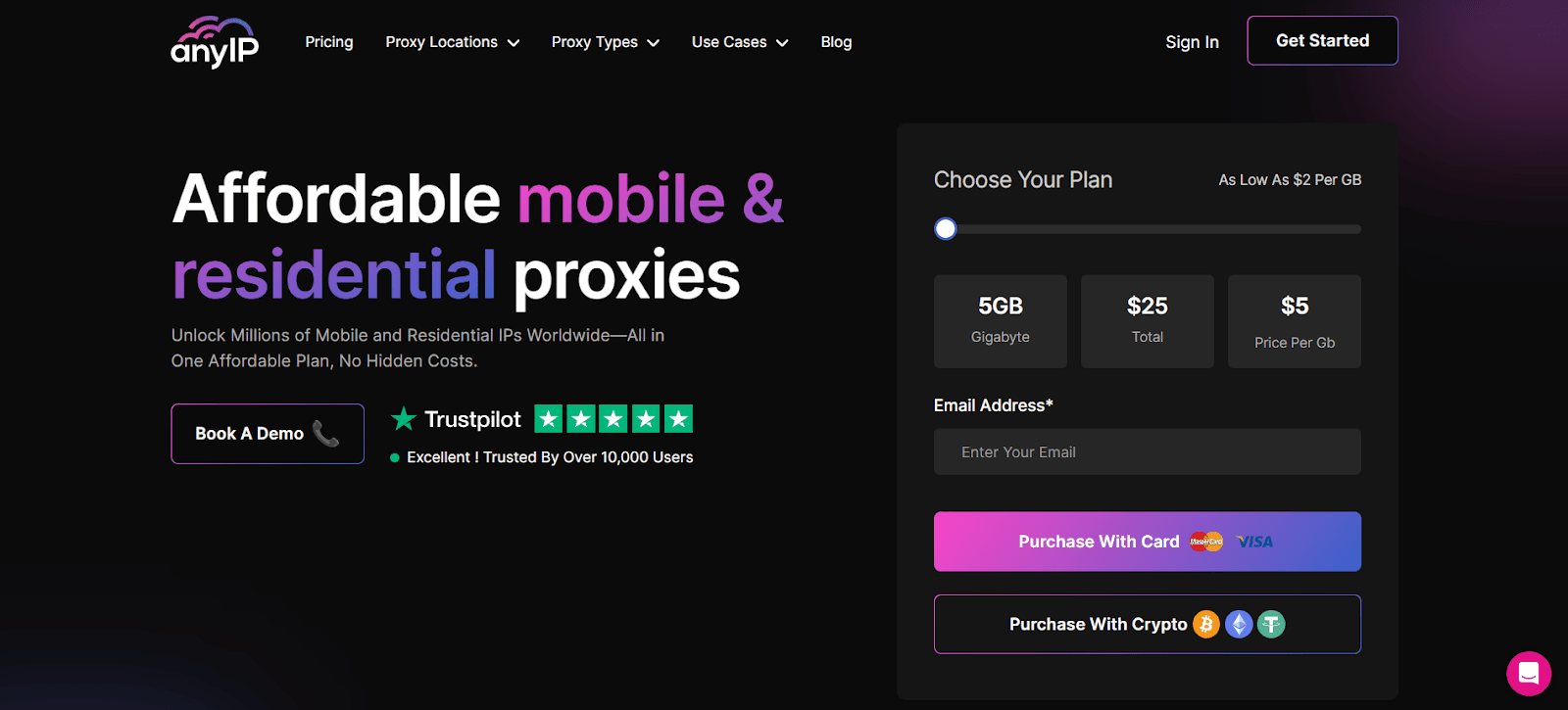
AnyIP
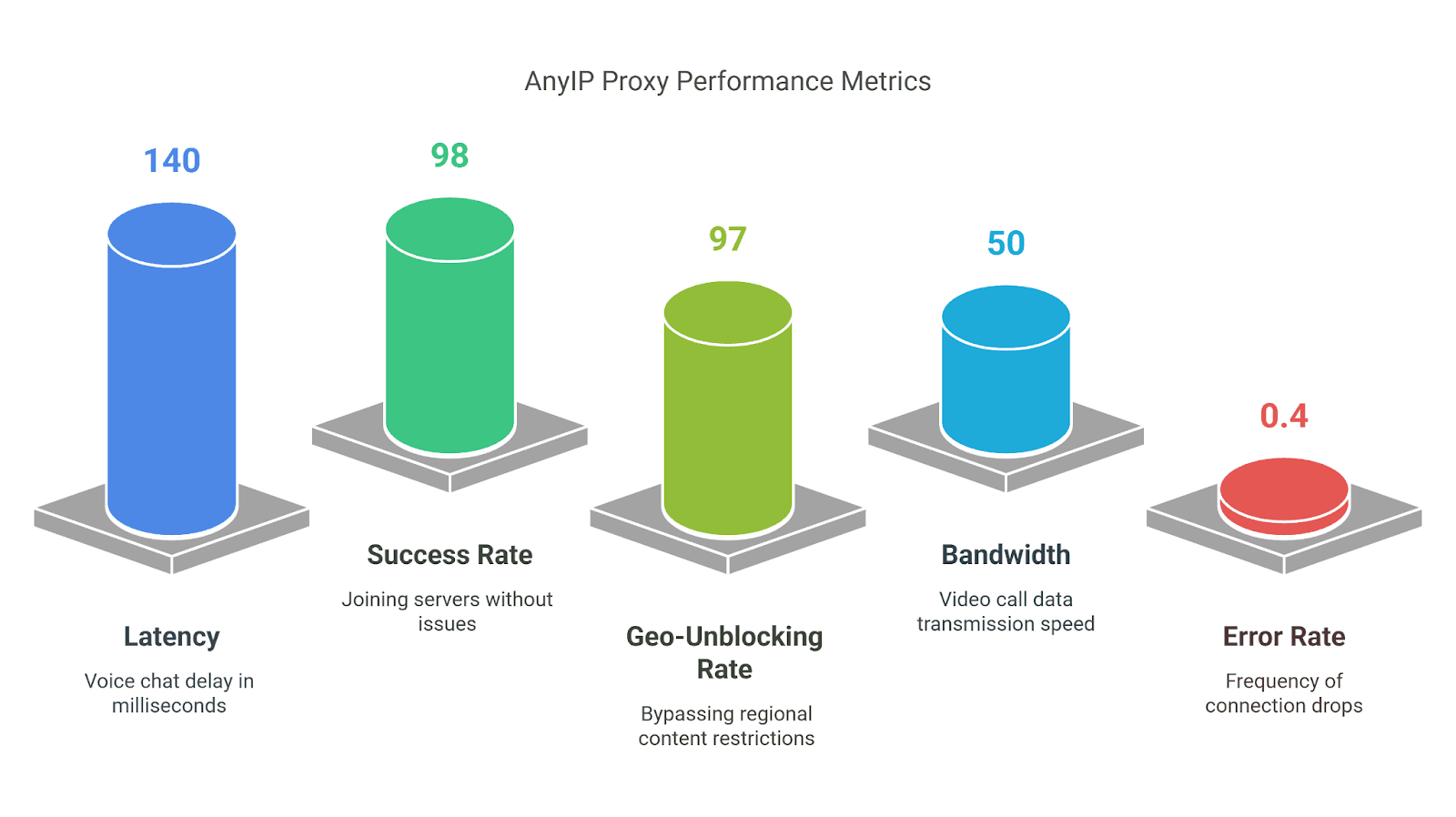
120-180ms
100M+
Residential, Mobile
$2.00 /GB
14-day refund
Yes (country-level)
Simple dashboard
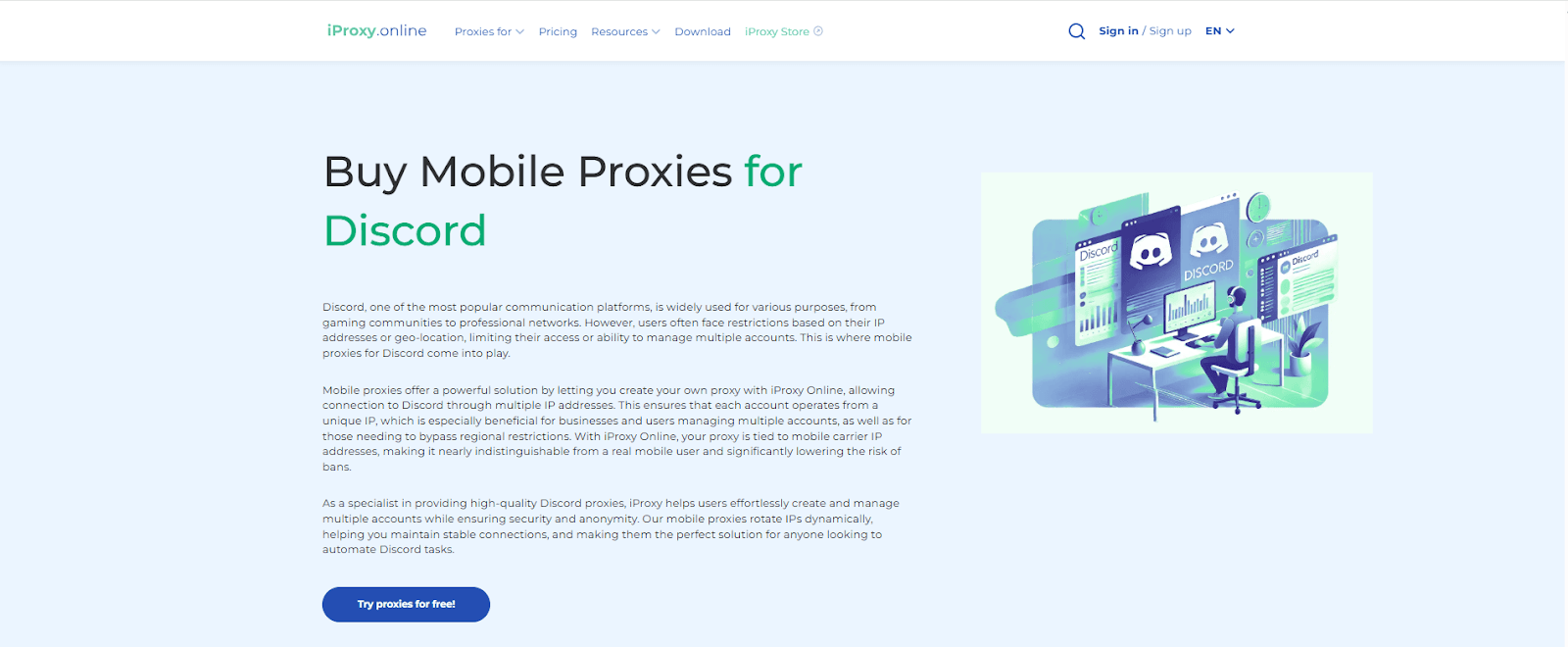
iProxyOnline
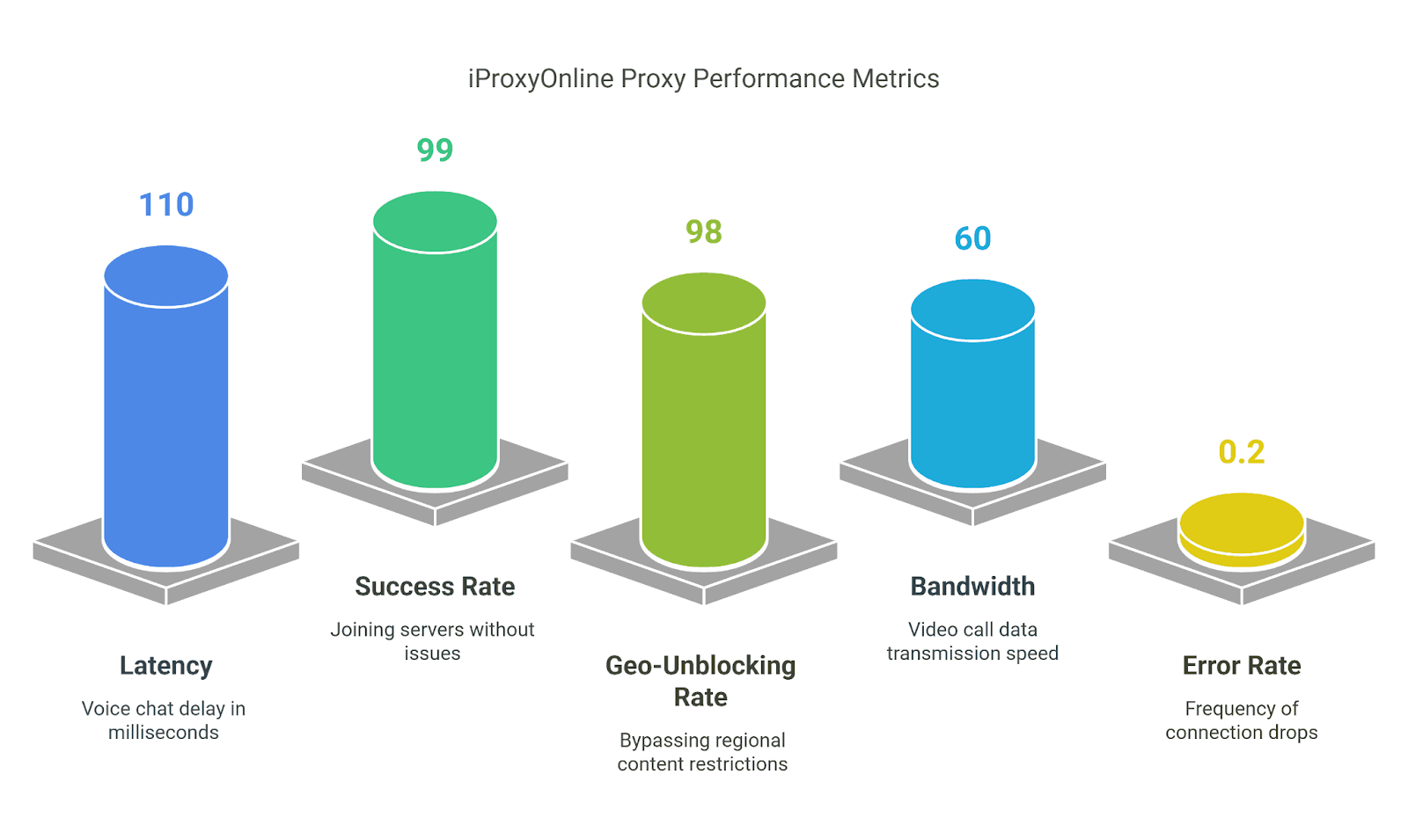
100-150ms
Depends on user devices, no fixed pool
Mobile (4G/5G)
$6/month
2 days
Yes (country-level)
Manual setup
Top Discord Proxies — Detailed Reviews
1. BrightData — Best for Bypassing Geo-Restrictions on Discord
Key Facts:
100M+ residential IPs—across 195 countries to bypass Discord geo-restrictions.
Rotating IPs—prevent Discord from detecting your real location.
SOCKS5/HTTP/HTTPS—support ensures stable connections for Discord.
99% uptime—guarantees uninterrupted access to Discord communities.
Show detailsHide details
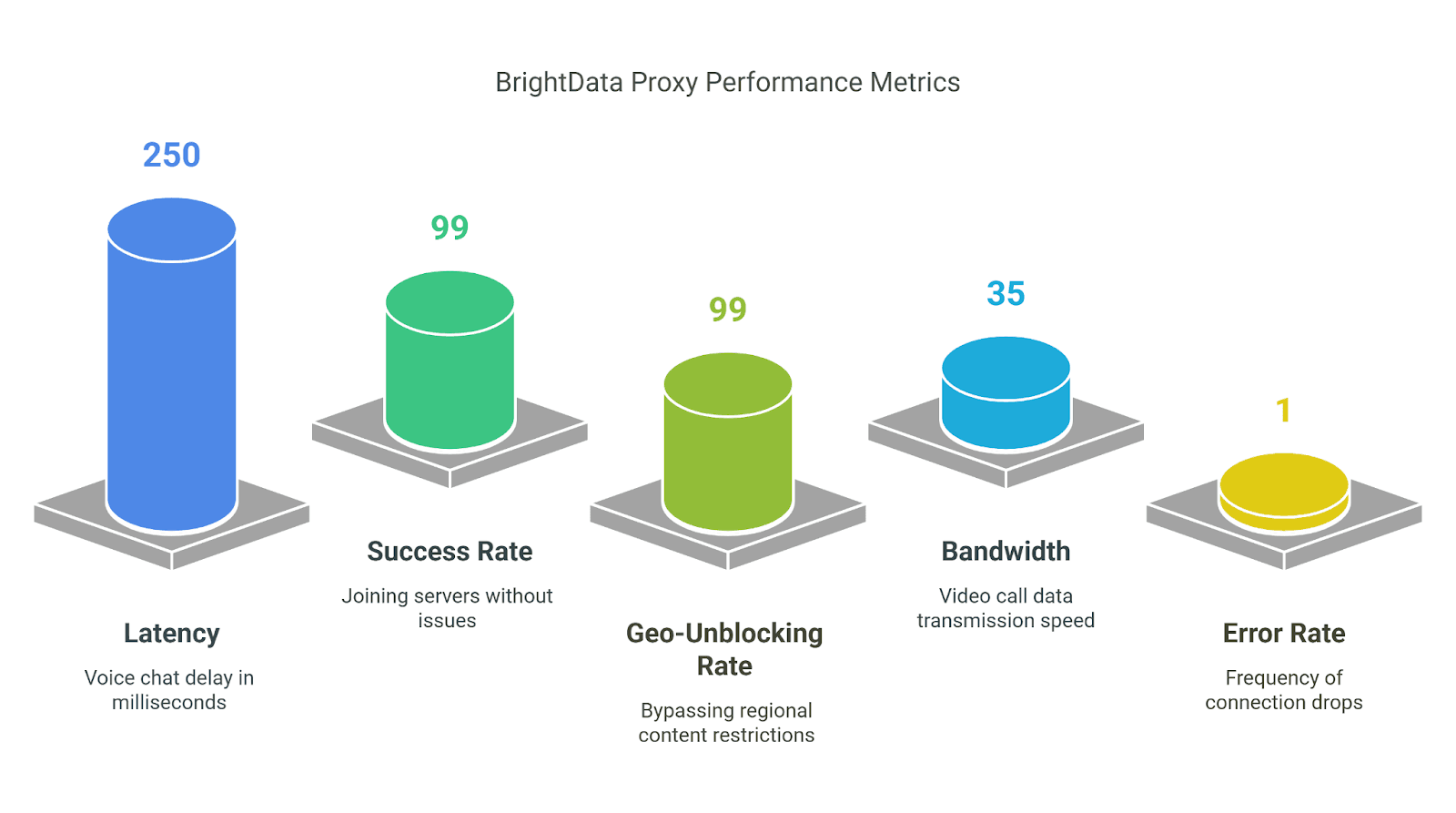
Compatibility: It works with Discord on desktops, mobile devices, and browsers via extensions; it also integrates with bot tools like Discord.js for automation. Test Results:
All About Money:Free Trial: Yes, 7-day trial. Payment Methods:
PayPal
Visa
Amex
Payoneer
Nacha
Prices and Tariff Plans:
Proxy Type
Plan
Price per GB/IP
Total Cost (Monthly)
Residential
Pay As You Go
$4.2 / GB
No commitment
678 GB Included
$2.94 / GB
$1999
ISP
10 IPs
$1.8 / IP
$18
1000 IPs
$1.3 / IP
$1,300
Datacenter
10 IPS
$1.40 / IP
$14
1000 IPs
$0.90 / IP
$900
Mobile
Pay As You Go
$8.4 / GB
–
339 GB Included
$5.88 / GB
$1,999
Why Choose BrightData? While traveling in Europe, I needed to join a US-only Discord server, and BrightData provided the solution. Its 100M+ IP pool let me select a New York IP, and I was in within seconds—no blocks, no hassle. If you’re on a tight budget or need lower latency for gaming, you might want to look elsewhere, but for bypassing restrictions, BrightData is a top-tier proxy choice.
2. Toolip — Best for Managing Multiple Discord Accounts Safely
Key Facts:
70M+ residential IPs across 195 countries—keeps your Discord accounts untraceable.
Sticky sessions up to 20GB per proxy—stable for managing multiple profiles.
SOCKS5/HTTP/HTTPS support—smooth Discord connections, no drops.
Rotating IPs— provides low detection risk when switching between accounts.
99.99% uptime—your bots or accounts stay online 24/7.
Show detailsHide details
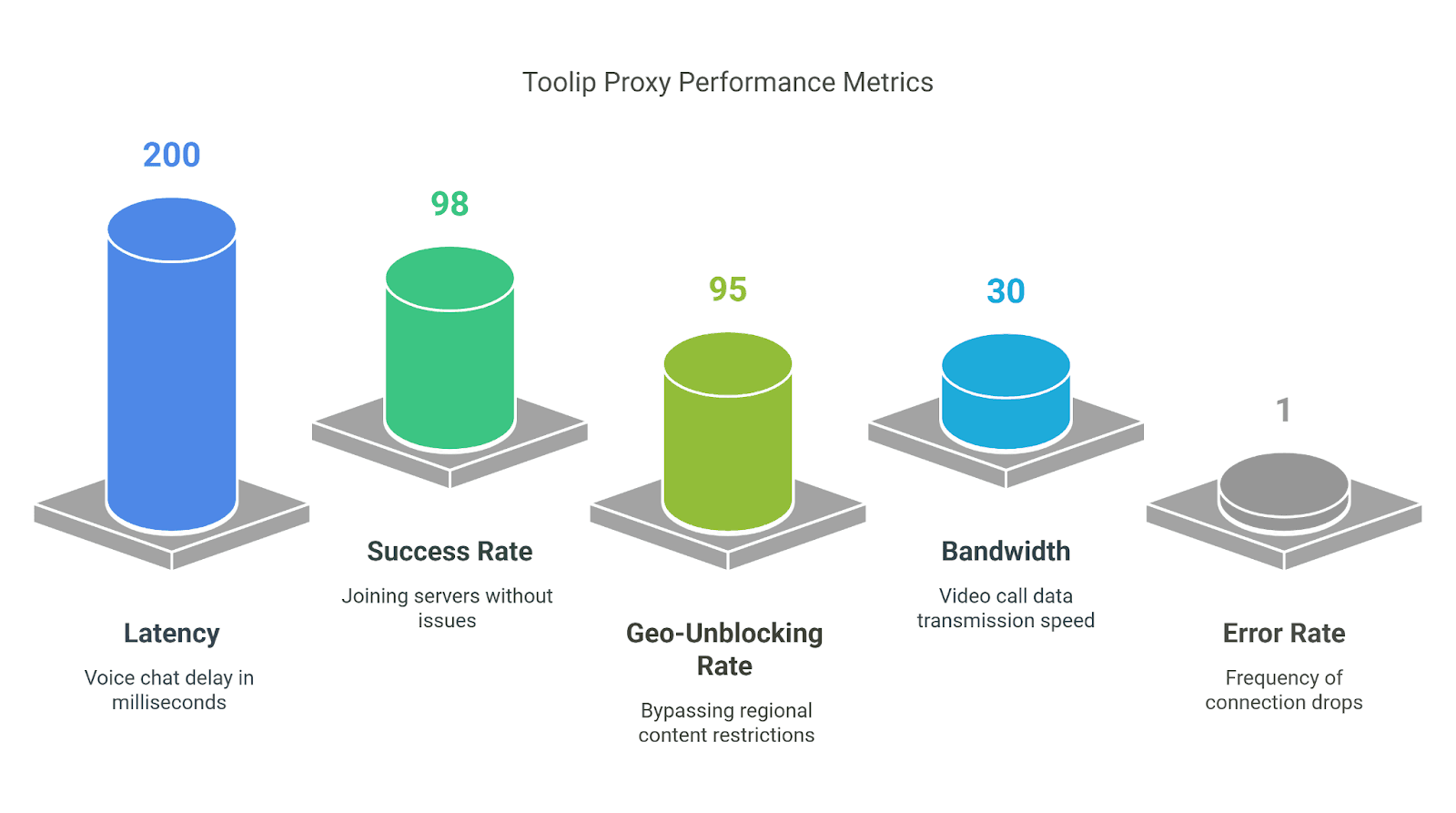
Compatibility: It is compatible with Discord on desktop, mobile, and browsers through manual setup, and it also syncs with bot tools or automation scripts. Test Results:
All About Money:Free Trial: 1-week trial with 5 free proxies. Payment Methods:
PayPal
Visa
MasterCard
Google Pay
Prices and Tariff Plans:
Proxy Type
Plan
Bandwidth
Price per IP/GB
Total Cost (Monthly)
Shared Datacenter Proxies
3-day (Free)
Up to 100MB
$0 / IP
$0
100 proxies
Up to 2000GB
$0.29 / IP
$28.99
Dedicated Datacenter Proxies
5 proxies
Up to 100GB
$2.00 / IP
$9.99
100 proxies
Up to 2000GB
$1.28 / IP
$127.99
Global ISP Proxies
1 proxy
Up to 1000GB
$1.99 / IP
$1.99
50 proxies
Up to 50000GB
$0.80 / IP
$39.99
Search Engine ISP Proxies
1 proxy
Up to 1000GB
$2.99 / IP
$2.99
50 proxies
Up to 50000GB
$1.96 / IP
$97.99
Rotating Residential Proxies
10 GB
-
$2.40 / GB
$23.99
100 GB
-
$2.03 / GB
$202.99
Why Choose Toolip? I run five Discord accounts for community projects, and Toolip’s rotating IPs kept them all safe—no bans after a week. The free trial unblocked a server and ran my bots flawlessly. Latency’s a bit high for gaming, but for account management, it’s a budget-friendly beast.
3. Oculus — Best for High-Speed Voice and Video Calls
Key Facts:
100GBPS speed—blazing fast for Discord voice and video without lag.
99.99% uptime—zero interruptions during long calls or streams.
Over 300K IPs from 150+ countries—stable connections from anywhere.
Unlimited traffic (ISP/Shared/Dedicated)—no throttling, perfect for heavy use.
SOCKS5 support—optimized for Discord’s real-time features.
Show detailsHide details
Compatibility: It is compatible with Discord on desktop, mobile, and browsers via proxy settings. Test Results:
All About Money:Free Trial: 7-day trial with 5 Datacenter IPs (100MB bandwidth). Payment Methods:
Visa
MasterCard
American Express
PayPal
Prices and Tariff Plans:
Proxy Type
Plan
Price per GB/IP
Total Cost (Monthly)
ISP (Bandwidth Plans)
15 GB
$0.65 / GB
$9.75
100 GB
$0.55 / GB
$55
ISP (IP Plans)
30 IPs
$0.85 / IP
$25.50
200 IPs
$0.75 / IP
$150
Events & E-commerce
10 IPs
$0.72 / IP
$7.25
100 IPs
$0.65 / IP
$65
Shared Datacenter
100 MB (Free)
$0 / GB
$0 (7 days)
200 GB
$0.13 / GB
$25.00
Dedicated Datacenter
25 IPs
$0.60 / IP
$15
200 IPs
$0.50 / IP
$100
Rotating Residential
15 GB
$1.50 / GB
$22.50
100 GB
$1.10 / GB
$110
Sneakers Residential
5 GB
$1.10 / GB
$5.50
50 GB
$0.95 / GB
$47.50
Events Tickets Residential
5 GB
$1.30 / GB
$6.5
50 GB
$1.00 / GB
$50
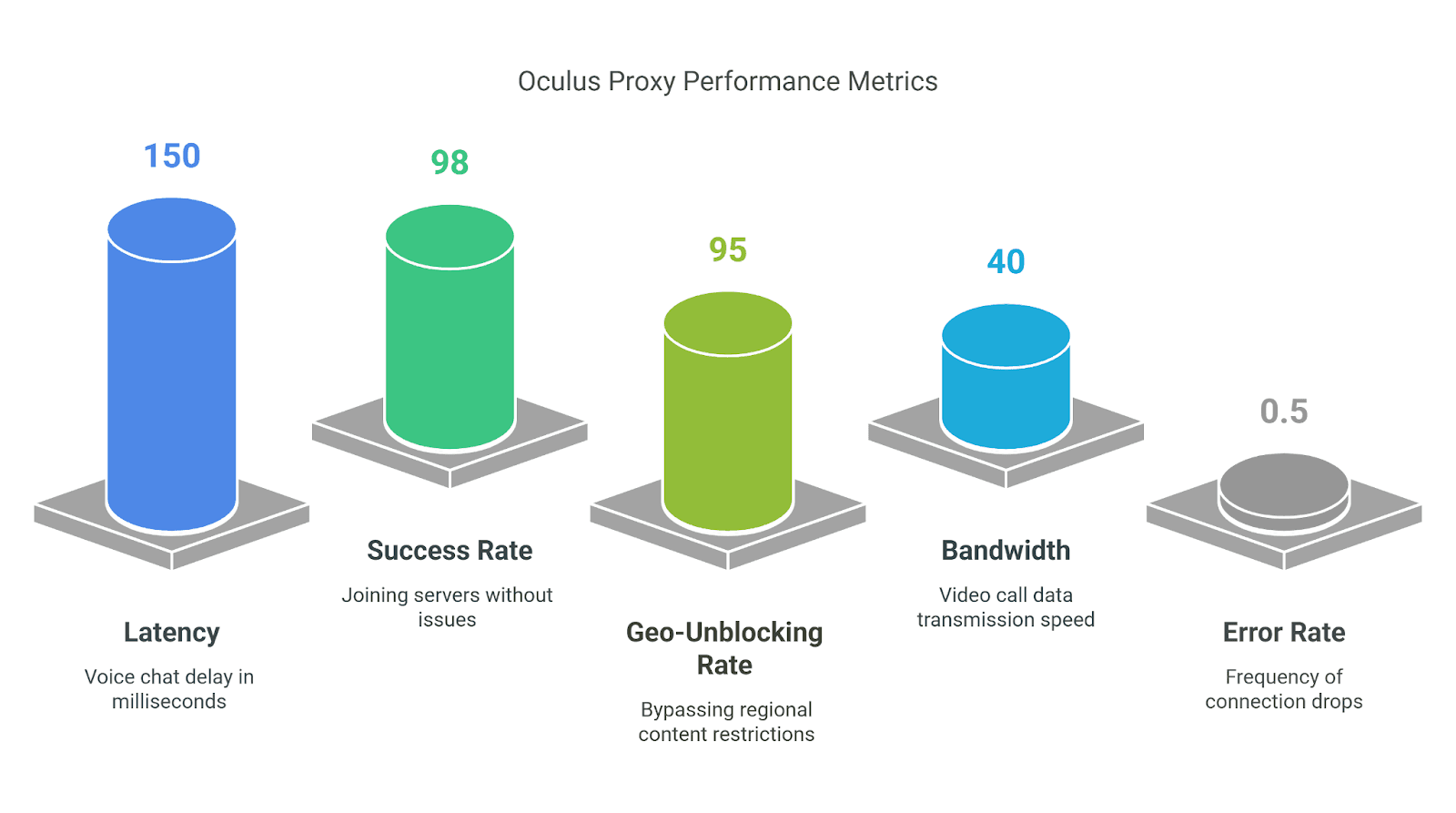
Why Choose Oculus? I tested Oculus for Discord movie nights—40 Mbps bandwidth and low latency made video calls buttery smooth, with no choppy audio or dropped frames. It’s not the cheapest for casual use, but for crystal-clear voice and video, it’s unmatched.
4. DataImpulse — Best for Automation via Discord API
Key Facts:
15M+ ethically sourced IPs in 195 countries—ideal for diverse bot testing scenarios.
Rotating and sticky sessions—perfect for API automation and stable connections.
1-second response time—fast API calls with no delays.
No traffic expiration—use your GBs whenever; ideal for long-term projects.
24/7 human support—quick help for tweaking bot setups.
Show detailsHide details
Compatibility: It works seamlessly with Discord on desktop, mobile, and web; it also integrates with Python, Discord.js, and bot frameworks for API automation. DataImpulse Test Results:
All About Money: Free Trial: No free trial, but a $5 Intro plan (5GB Residential, $1/GB). Payment Methods:
Visa
Mastercard
PayPal
Wire transfer
Crypto
Alipay
Apple Pay
Google Pay
Prices and Tariff Plans:
Proxy Type
Plan
Price per GB
Monthly Price
Residential
5 GB
$1 / GB
$5
1TB
$0.80 / GB
$800
Datacenter
10 GB
$0.50 / GB
$5
1TB
$0.45 / GB
$450
Mobile
2.5GB
$2 / GB
$5.00
1TB
$1.60 / GB
$1600
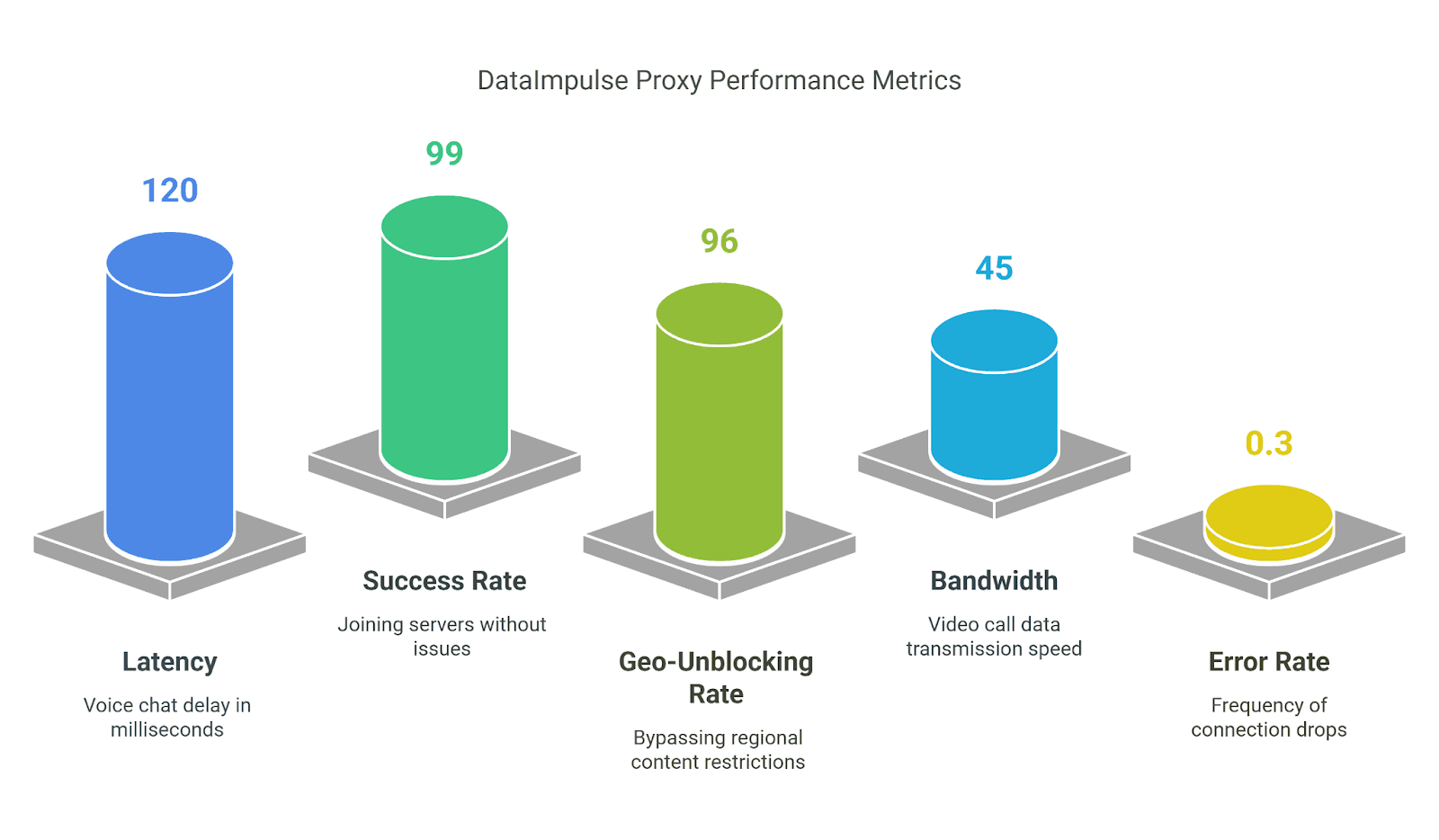
Why Choose DataImpulse? I developed a Discord bot to analyze server trends, and DataImpulse's large pool of IP addresses and sticky sessions made testing easy — no speed limits or bans during long API calls. Low latency ensures rapid response, and the affordable pricing plan makes it a low-risk option to get started. Generally speaking, if the task at hand is for automation, it makes it a solid choice.
100M+ Residential & Mobile IPs— a massive pool for untraceable Discord activity.
Unlimited IP rotation—swap IPs instantly to stay anonymous.
~0.6s response time—quick connections for seamless chats.
98.6% request success rate—reliable access without blocks.
Sticky sessions up to 7 days—stable IPs for consistent privacy.
Show detailsHide details
Compatibility: It is compatible with Discord on desktop, mobile, and browsers, and it supports HTTP/HTTPS, SOCKS5, and tools such as Python. Test Results:
All About Money:Free Trial: No free trial, but the $25 Micro Plan (5GB) acts as a low-entry test with a 14-day money-back guarantee. Payment Methods:
Mastercard
Visa
Crypto
Prices and Tariff Plans:
Plan
Price per GB
Monthly Price
Micro
$4.00
$20
Basic
$4.00
$80
Pro
$3.00
$300
Enterprise
$2.00
$1,000
Why Choose AnyIP? I used AnyIP to also use my Discord alt accounts under wraps; its 100M+ IPs and unlimited rotation made me invisible, with no bans after weeks of heavy use. Latency was perfectly acceptable for casual chats, and the $20 microplan allowed me to test it risk-free. Speed drops a bit on mobile proxies, but for anonymity, it's a definite plus.
6. iProxyOnline — Best for Cloud Gaming via Discord
Key Facts:
4G/5G mobile proxies via Android—low-latency connections for gaming.
Speed up to 100 Mbit/sec (BigDaddy Pro) for smooth cloud gaming streams.
Unlimited traffic—game without data caps.
99.9% uptime—reliable for Discord voice and streaming.
Global coverage—launch proxies anywhere with a SIM card.
Show detailsHide details
Compatibility: It is compatible with Discord on Android, iOS, desktop, and gaming consoles through proxy setup, and it also supports SOCKS5 and HTTP. Test Results:
All About Money:Free Trial: 2-day trial with BigDaddy Pro features. Payment Methods:
Mastercard
Visa
Crypto
Prices and Tariff Plans:
Plan
Monthly Price
Baby
$6.00
BigDaddy
$8.00
BigDaddy Pro
$10.00
Why Choose iProxyOnline? I configured iProxyOnline on an Android for Discord cloud gaming, and the high-speed plan managed smooth streams with low latency, ensuring no stuttering. Its stability for gaming makes it a dependable option, although setup can be challenging and requires a SIM card for each device.
Depending on your platform, setting up a proxy for Discord is straightforward; you may select from two basic approaches: proxy settings in your browser or mobile network settings. Below are detailed instructions to assist you in connecting fast and safely.
Use the Proxy Settings in Your Browser
For Discord users accessing the platform through a browser like Chrome, Firefox, or Edge, this method is the most seamless way to integrate a proxy. It’s ideal for bypassing IP bans or geo-restrictions without altering the Discord app itself:
Open your browser settings.
Find your proxy server or network settings — use the search bar if necessary.
Enable manual proxy configuration and disable automatic detection.
Enter the proxy IP address and port provided by your proxy service.
Save the settings, and then access Discord through your browser.
Test by connecting to a previously blocked server to make sure the proxy is working.
For Discord Mobile App
If you use Discord on your phone, you should directly set up a proxy through your device's network settings. Furthermore, this method works on both Android and iOS devices:
Go to “Settings” and then to “Wi-Fi” on your phone.
Select the active Wi-Fi network and tap Advanced or Change Network.
Select Manual under Proxy Settings.
Enter the IP address and port of the proxy server provided by the proxy service.
Save your changes, and then launch the Discord app.
Join the server to test the connection ; if it was previously blocked, you should now be able to access it.
Conclusion
Proxies for Discord in 2025 are already commonplace if you want to bypass bans, speed up chats, or keep several accounts safe. After 50 hours of tests on speed, security, compatibility, and ease of customization, a picture emerged: there are options for everything— from geo-unblocking and anonymity to clear voice and automation. Prices, IP types, and trials—everything is laid out on the table and in the reviews. Take what suits the task, turn on the proxy, and make Discord faster, safer, and more reliable. This simplifies the process by centralizing everything in one location.